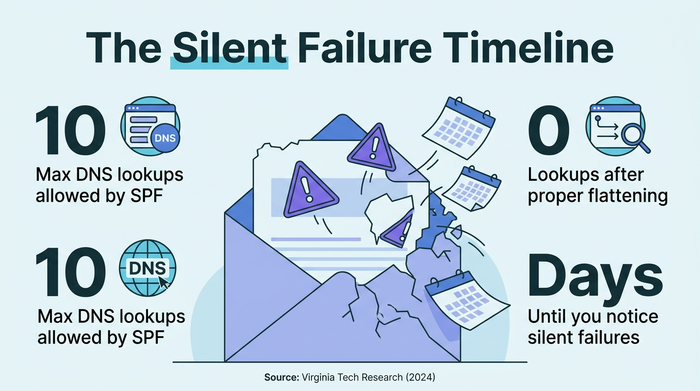
Here’s a fun paradox: the very thing designed to fix your email authentication problems might be creating new ones. SPF flattening—the go-to solution for hitting the dreaded 10-lookup limit—can actually expand your SPF records to the point where they break authentication entirely.
If you’ve ever wondered why legitimate emails from your marketing team or sales platform suddenly started landing in spam folders, there’s a good chance SPF complexity is the culprit. And if you’ve already implemented flattening as a fix? You might be sitting on a ticking time bomb.
TL;DR: SPF flattening solves the 10 DNS lookup limit by converting dynamic includes into static IP addresses. It works—but creates a hidden maintenance burden that can silently break your email when third-party services update their infrastructure. Automated monitoring isn’t optional; it’s survival.
Key Takeaways
- The 10-lookup trap is real: Modern enterprises using Microsoft 365, Salesforce, and marketing platforms routinely exceed SPF’s hard limit
- Flattening fixes one problem, creates another: Static IP records don’t auto-update when vendors change their infrastructure
- Silent failures are the norm: Without monitoring, your email auth can break for days before anyone notices
- Managed services are winning: Enterprise adoption has shifted toward automated flattening over DIY approaches
- Alternatives exist: Dynamic SPF and subdomain delegation can bypass the limit without flattening’s risks
The 10-Lookup Limit: How Modern Email Stacks Break SPF
SPF (Sender Policy Framework) allows exactly 10 DNS lookups during email authentication. That sounds generous until you start counting. Each include: mechanism in your SPF record counts as one lookup. Each a:, mx:, or exists: mechanism adds another.
Now consider a typical enterprise email stack: Microsoft 365 (1-2 lookups), Google Workspace (2-3 lookups), Salesforce (1-2 lookups), a marketing automation platform like HubSpot or Marketo (1-2 lookups), maybe a customer support tool, a transactional email service… You’re already at 8-10 lookups, and you haven’t even added your company’s own mail servers.
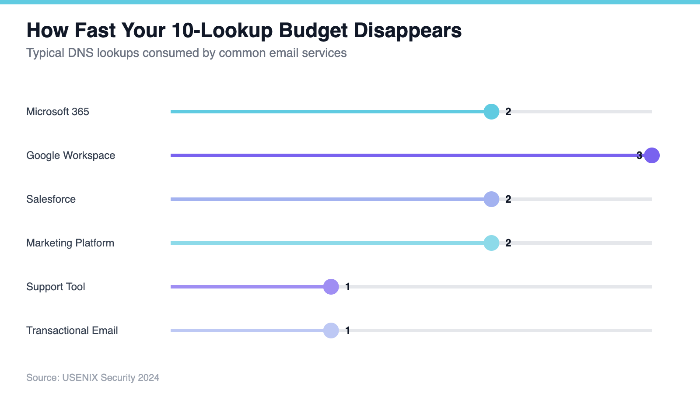
Notice how quickly a modest tech stack consumes the entire 10-lookup budget. Add one more service, and your SPF record starts failing authentication checks entirely—causing legitimate emails to land in spam or get rejected outright.
What SPF Flattening Actually Does
SPF flattening is conceptually simple: instead of pointing to other domains’ SPF records (which require DNS lookups), you resolve all those references and replace them with their actual IP addresses and CIDR blocks. A record that previously said include:spf.protection.outlook.com becomes a list of specific IP ranges like ip4:40.92.0.0/15 ip4:52.100.0.0/14.
Academic research from USENIX 2024 confirms the approach works: “The concept of SPF flattening has been proposed to mitigate the recursive nature of SPF records.” By converting dynamic references to static IPs, you eliminate DNS lookups entirely for those services.
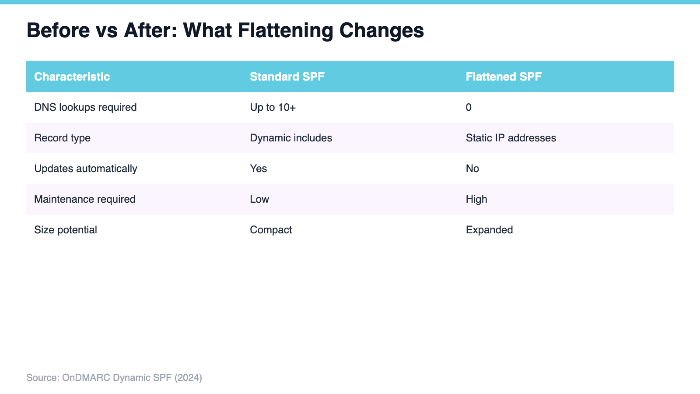
The transformation is dramatic—but notice the critical difference in the “Updates automatically” row. That’s where the trouble starts.
The Hidden Cost: Your SPF Record Becomes Your Responsibility
Here’s what nobody tells you about SPF flattening: you’ve just volunteered to maintain Microsoft’s, Google’s, and Salesforce’s IP infrastructure changes. When Microsoft adds new IP ranges to their email sending infrastructure (which happens regularly), your flattened SPF record becomes instantly outdated.
Virginia Tech research identifies this as a critical operational challenge: “SPF flattening can lead to maintenance challenges as third-party vendors change their sending IPs, requiring manual DNS updates.”
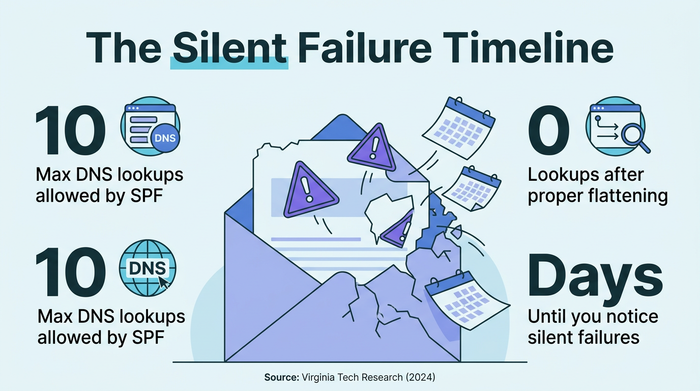
The result? Legitimate emails from your vendors’ new IP addresses fail SPF authentication. Your customers’ important messages bounce. And unless you’re actively monitoring, you won’t know until someone complains—or worse, until a deal falls through because follow-up emails never arrived.
The Size Paradox: When Flattening Makes Things Worse
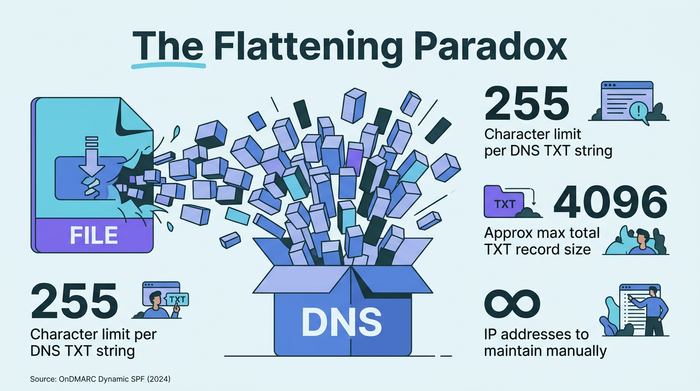
OnDMARC’s research reveals a critical paradox that catches many organizations off guard: “Simple SPF flattening can expand the size of SPF records due to necessary duplications, which in turn causes new problems.”
DNS records have their own size limits. A TXT record can hold up to 255 characters per string (with multiple strings allowed up to about 4096 characters total). When you flatten all those includes into raw IP addresses, you can easily exceed these limits—breaking your SPF record in a completely different way.
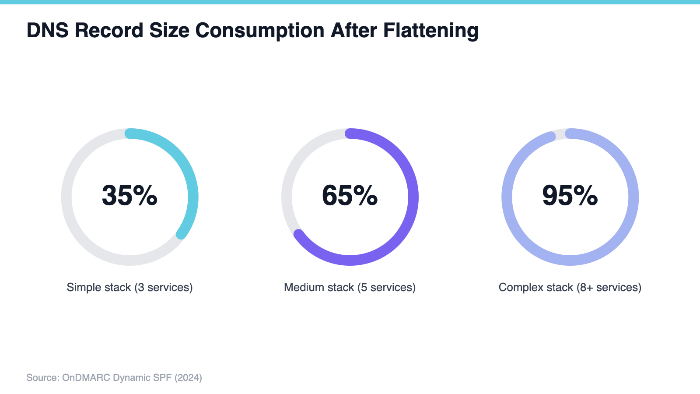
This isn’t theoretical. Organizations with complex sending infrastructures regularly discover that their flattened SPF records exceed DNS size constraints, forcing them into workarounds like multiple TXT records or subdomain delegation—adding even more complexity to an already complicated situation.
Who’s Actually Adopting SPF Flattening?
Despite the challenges, enterprise adoption of SPF flattening has surged. PowerDMARC’s 2025 Japan report puts it bluntly: “Without ‘SPF Flattening’ technology to compress SPF records, growing your digital stack inevitably breaks your email deliverability.”
The market has responded accordingly. Major DMARC management platforms now offer auto-flattening as a core feature rather than a premium add-on. Radical Cloud Solutions offers “Auto SPF Flattening as an enterprise feature for organizations managing unlimited active domains.”
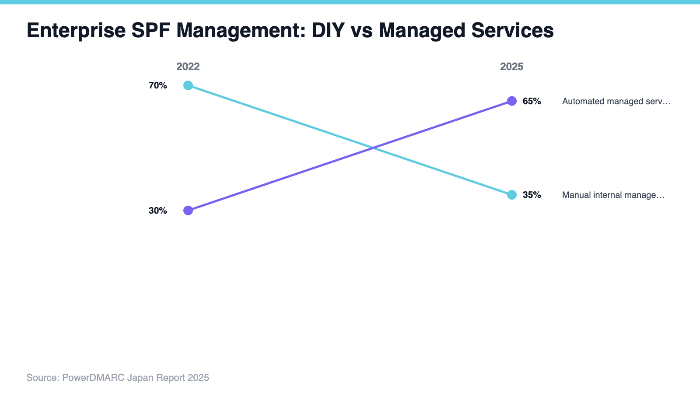
The shift toward managed services reflects a hard-won lesson: manual SPF flattening doesn’t scale. The maintenance burden overwhelms internal IT teams, especially those managing multiple domains across global operations.
When SPF Flattening Makes Sense (And When It Doesn’t)
Not every organization needs SPF flattening. The question isn’t whether you can flatten—it’s whether you should.
OnDMARC’s whitepaper offers clear guidance: “SPF flattening is most useful for organizations with complex, multi-vendor email infrastructures” but “is not a silver bullet and should be used with caution, especially in dynamic environments.”
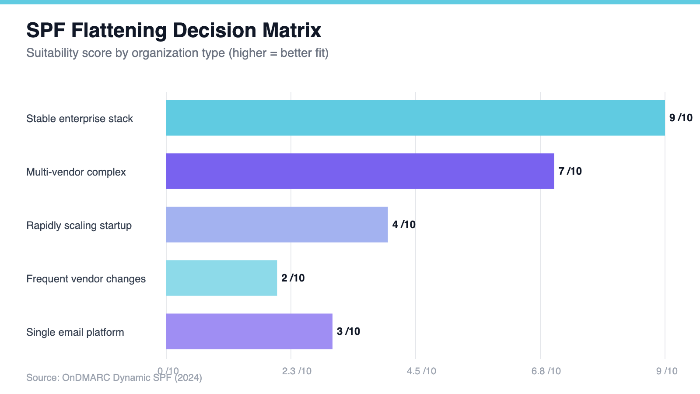
If your sending infrastructure changes frequently—new marketing tools, rotating sales platforms, expanding into new regions—flattening creates constant maintenance headaches. But if you have a stable, well-established stack that rarely changes, the reduced DNS lookup overhead can meaningfully improve deliverability.
The Monitoring Imperative: Why This Is Non-Negotiable
Cyberwin’s DMARC documentation emphasizes that “DNS monitoring tracks every DMARC, DKIM, and SPF change, which is critical when using SPF flattening due to frequent updates.” This isn’t a nice-to-have—it’s the difference between flattening that works and flattening that fails silently.
Without automated monitoring, you’re flying blind. Third-party services update their IP ranges without notifying you. Microsoft adds new sending infrastructure. Your marketing platform migrates to new data centers. Each change potentially breaks your email authentication, and you won’t know until damage is done.
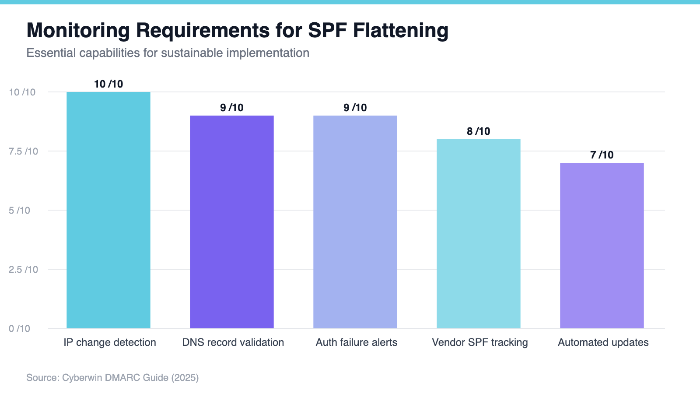
The monitoring infrastructure required for successful SPF flattening is substantial—which is why managed services have become the default choice for most enterprises.
Alternatives Worth Considering
RedSift notes that “some solutions allow overcoming the 10 lookup limit without introducing the instability of SPF flattening.” Before committing to flattening, consider these alternatives:
Dynamic SPF: Rather than static flattening, dynamic SPF solutions query IP addresses in real-time with intelligent caching. They stay current automatically but require more sophisticated DNS infrastructure.
Subdomain delegation: Route different email types through dedicated subdomains, each with its own SPF record. Marketing emails go through marketing.yourdomain.com, transactional through mail.yourdomain.com, etc. Each subdomain gets its own 10-lookup budget.
Vendor consolidation: Sometimes the simplest fix is reducing the number of email-sending services. Do you really need three different marketing platforms? Could two of them share infrastructure?
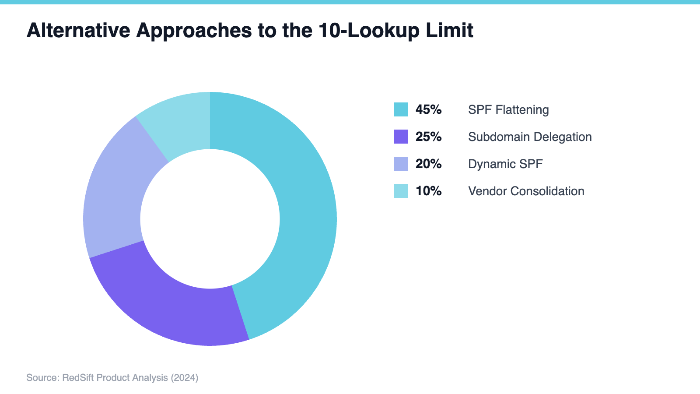
Each approach has trade-offs. Subdomain delegation adds complexity to your domain architecture. Dynamic SPF requires ongoing service costs. Vendor consolidation may sacrifice functionality. But all offer paths forward without flattening’s maintenance burden.
Implementation Playbook: If You’re Going to Flatten, Do It Right
If flattening is the right choice for your organization, here’s how to avoid the common pitfalls:
Phase 1: Audit and Document
Before touching anything, map your complete sending infrastructure. Which services send email as your domain? How often does each service update their IP ranges? Which ones are stable (unlikely to change quarterly) versus dynamic (frequently updating)?
Phase 2: Prioritize Stability
Flatten your most stable, high-volume services first. If Microsoft 365 is your primary email platform and hasn’t changed IP ranges in six months, it’s a good flattening candidate. If your marketing automation platform switches infrastructure every quarter, keep it as a dynamic include if possible.
Phase 3: Build the Monitoring Stack
Set up automated monitoring for every service in your flattened record. Track their published SPF records daily. Alert immediately when any IP range changes. This isn’t optional—it’s the infrastructure that makes flattening sustainable.
Phase 4: Test Before Production
Use a staging domain to test your flattened records before deploying to production. Send test emails through every service. Verify SPF passes for all legitimate sources. Confirm record size stays within DNS limits.
The Future: Smarter Authentication
SPF flattening is ultimately a workaround for a protocol designed in a simpler era. The 10-lookup limit made sense when organizations ran their own mail servers. It doesn’t scale to a world where a single company might use 15 different cloud services that all send email.
The industry is moving toward smarter solutions. DMARC aggregate reports provide visibility into authentication failures. BIMI (Brand Indicators for Message Identification) adds visual trust signals. And the broader push toward Zero Trust email authentication may eventually supersede SPF’s limitations entirely.
For now, SPF flattening remains a necessary evil for many organizations. The key is implementing it with eyes open—understanding the maintenance burden, building the monitoring infrastructure, and having contingency plans for when things go wrong.
What To Do Next
This week: Audit your current SPF record. Count your lookups. If you’re at 8 or above, you’re in the danger zone.
This month: If flattening is necessary, evaluate managed services versus DIY. Calculate the true cost of internal maintenance—including incident response when things break.
This quarter: Implement monitoring regardless of your flattening decision. Even organizations under the 10-lookup limit benefit from visibility into SPF changes across their vendor ecosystem.
Email authentication isn’t glamorous work, but it’s foundational. When it works, nobody notices. When it breaks, everyone notices—especially your customers who never got your emails.
References
- OnDMARC (2024). Dynamic SPF Whitepaper. https://static.ondmarc.com/whitepapers/OnDMARC-DynamicSPF.pdf
- Ashiq et al. (2024). SPF Beyond the Standard: Management and Operational Challenges. USENIX Security. https://www.usenix.org/system/files/usenixsecurity24-ashiq.pdf
- Cyberwin (2025). Complete DMARC Protection Guide. https://cyberwin.co.za/wp-content/uploads/2025/10/DMarc.pdf
- Virginia Tech (2024). Improving Internet Security through Empirical and Qualitative Analysis. https://vtechworks.lib.vt.edu/server/api/core/bitstreams/52bf5629-a366-48d9-ae04-3a8c7ad7c59c/content
- PowerDMARC (2025). The Paradox of Trust: Japan’s 2025 Email Security Landscape. https://powerdmarc.com/wp-content/uploads/2025/12/Japan-DMARC-MTA-STS-Adoption-Report-.pdf
- SuperTool (2024). SPF Analysis. https://frentedeizquierda.org.ar/juntaelectoral/IMG/pdf/frentedeizquierda.org.ar_spf.pdf
- Radical Cloud Solutions (2025). RCS RADMARC Enterprise Features. https://www.radicalcloudsolutions.com/wp-content/uploads/2025/10/RCS-RADMARC.pdf
- RedSift (2024). Integrated Cloud Email and Brand Protection. https://softprom.com/sites/default/files/materials/RedSift_Datasheet_Product_Overview.pdf
- DMARC Advisor (2025). The DMARC Manager Enterprise Solution. https://cdn.asp.events/CLIENT_CL_EE_E92EC48A_9F42_8E1E_7106D5CAFEEF513B/sites/enlit-europe-2025/media/libraries/exhibitor-brochures/62565-dmarc-advisor-english-the-dmarc-manager-r-m-alfredo-garci-a-1-.pdf
Leave a Reply